Thursday, September 20, 2018

Swift development journey on Linux


After a few days of search to find the best IDE for Swift development on Linux/Ubuntu,
I concluded that currently the choice is VS Code + Swift Development Environment extension

First we need to download Swift from Swift.org
Follow download instructions. Just one note about setting toolchain path - if you run:
$ export PATH=/path/to/usr/bin:"${PATH}"

That change will affect $PATH variable only in current terminal seasson.
To make it permanent, there are few options on Ubuntu. For example, I appended
$ export PATH="$HOME/Dev/swift-4.2/usr/bin:$PATH"

to ~/.profile and that did the trick. The script gets loaded on re-login or it can be run manually by executing . ~/.profile.


Second step is installation of VS Code. Just a few clicks in Ubuntu Software app.

Next we install Maintained Swift Development Environment extension. There are several steps here and thy are described in extension's marketplace page and github. Make sure you also install LLDB extension for debugging.


All done? Great, now it's time to run some swift code. But first run some commands to create a Hello project:
$ mkdir HelloSwift
$ cd HelloSwift
$ swift package init --type=executable

Now in VS Code chose File/ Open Folder... and selecte HelloSwift.
Select Debug view (Ctrl+Shift+D)
Add LLDB configuration. launch.json should look like this:

{
    // Use IntelliSense to learn about possible attributes.
    // Hover to view descriptions of existing attributes.
    // For more information, visit: https://go.microsoft.com/fwlink/?linkid=830387
    "version": "0.2.0",
    "configurations": [
        {
            "type": "lldb",
            "request": "launch",
            "name": "Debug",
            "program": "${workspaceFolder}/.build/debug/HelloSwift",
            "args": [],
            "cwd": "${workspaceFolder}",
            "preLaunchTask": "swift-build"
        }
    ]
}

Tap Run button and alert pops up about missing swift-build task. Tap Configure Task.
tasks.json should look like this:

{
    // See https://go.microsoft.com/fwlink/?LinkId=733558
    // for the documentation about the tasks.json format
    "version": "2.0.0",
    "tasks": [
        {
            "label": "swift-build",
            "type": "shell",
            "command": "swift build"
        }
    ]
}


Tap Run again and voila! Console shows:

Hello, world!
Process exited with code 0.

Thursday, December 14, 2017

View App Store reviews on Slack


AppStoreReviews is a command line tool which can send latest reviews for an app to Slack using Incoming Webhooks.

The tool can be called with following arguments:
-a AppId -c CountryCode -s WebHookId
For example: AppStoreReviews -a 584557117 -c us -s 234234/sdfsf/234324

Only AppId is mandatory. If WebHookId is omitted, reviews will be printed to standard output.

To obtain Slack Webhook URL, Slack app needs to be created with Incoming Webhooks feature.  Last 3 parts of URL are used as WebHookId.

To automate messaging process, we can tell OS to call the tool at designated times. To do that create a file containing job description and place it in ~/Library/LaunchAgents.

For example, this is job description that calls tool every day at 8:45:

 <?xml version="1.0" encoding="UTF-8"?>  
 <!DOCTYPE plist PUBLIC "-//Apple//DTD PLIST 1.0//EN" "http://www.apple.com/DTDs/PropertyList-1.0.dtd">  
 <plist version="1.0">  
 <dict>  
  <key>KeepAlive</key>  
  <false/>  
  <key>Label</key>  
  <string>com.mijocoder.AppStoreReviews</string>  
  <key>ProgramArguments</key>  
      <array>  
         <string>/Users/mijo/Dev/appstore-cli/AppStoreReviews</string>  
         <string>-a</string>
         <string>584557117</string>   
         <string>-s</string>
         <string>234234/sdfsf/234324</string>  
      </array>  
  <key>StandardOutPath</key>  
  <string>/Users/mijo/Dev/appstore-cli/log.stdout</string>  
  <key>StartCalendarInterval</key>  
   <array>  
    <dict>  
     <key>Hour</key>  
     <integer>8</integer>  
     <key>Minute</key>  
     <integer>45</integer>  
    </dict>  
   </array>  
 </dict>  
 </plist>  

To find out more about Launch Agents check launchd.info.

Monday, October 23, 2017

Git broken on MacOS High Sierra

Today I updated to MacOS High Sierra and everything was fine until I tried to execute:
git push origin my_branch
I was greeted with this output:

failed MSpanList_Insert 0x96b000 0x419b0d8d161 0x0 0x0
fatal error: MSpanList_Insert
runtime stack:
runtime.throw(0x5f1530, 0x10)
/usr/local/Cellar/go/1.6.1/libexec/src/runtime/panic.go:530 +0x90 fp=0x7ffeefbff490 sp=0x7ffeefbff478
runtime.(*mSpanList).insert(0x8503a8, 0x96b000)
/usr/local/Cellar/go/1.6.1/libexec/src/runtime/mheap.go:933 +0x293 fp=0x7ffeefbff4c0 sp=0x7ffeefbff490
runtime.(*mheap).freeSpanLocked(0x84fba0, 0x96b000, 0x100, 0x0)
/usr/local/Cellar/go/1.6.1/libexec/src/runtime/mheap.go:809 +0x4be fp=0x7ffeefbff528 sp=0x7ffeefbff4c0
runtime.(*mheap).grow(0x84fba0, 0x8, 0x0)
/usr/local/Cellar/go/1.6.1/libexec/src/runtime/mheap.go:675 +0x2a0 fp=0x7ffeefbff580 sp=0x7ffeefbff528
runtime.(*mheap).allocSpanLocked(0x84fba0, 0x1, 0x0)
/usr/local/Cellar/go/1.6.1/libexec/src/runtime/mheap.go:553 +0x4e3 fp=0x7ffeefbff5d8 sp=0x7ffeefbff580
runtime.(*mheap).alloc_m(0x84fba0, 0x1, 0x15, 0x0)
/usr/local/Cellar/go/1.6.1/libexec/src/runtime/mheap.go:437 +0x119 fp=0x7ffeefbff608 sp=0x7ffeefbff5d8
runtime.(*mheap).alloc.func1()
/usr/local/Cellar/go/1.6.1/libexec/src/runtime/mheap.go:502 +0x41 fp=0x7ffeefbff638 sp=0x7ffeefbff608
runtime.systemstack(0x7ffeefbff658)
/usr/local/Cellar/go/1.6.1/libexec/src/runtime/asm_amd64.s:307 +0xab fp=0x7ffeefbff640 sp=0x7ffeefbff638
runtime.(*mheap).alloc(0x84fba0, 0x1, 0x10000000015, 0x103cf)
/usr/local/Cellar/go/1.6.1/libexec/src/runtime/mheap.go:503 +0x63 fp=0x7ffeefbff688 sp=0x7ffeefbff640
runtime.(*mcentral).grow(0x8517a0, 0x0)
/usr/local/Cellar/go/1.6.1/libexec/src/runtime/mcentral.go:209 +0x93 fp=0x7ffeefbff6f0 sp=0x7ffeefbff688
runtime.(*mcentral).cacheSpan(0x8517a0, 0x84a2f8)
/usr/local/Cellar/go/1.6.1/libexec/src/runtime/mcentral.go:89 +0x47d fp=0x7ffeefbff730 sp=0x7ffeefbff6f0
runtime.(*mcache).refill(0x967000, 0x15, 0x7ffeefbff798)
/usr/local/Cellar/go/1.6.1/libexec/src/runtime/mcache.go:119 +0xcc fp=0x7ffeefbff768 sp=0x7ffeefbff730
runtime.mallocgc.func2()
/usr/local/Cellar/go/1.6.1/libexec/src/runtime/malloc.go:642 +0x2b fp=0x7ffeefbff788 sp=0x7ffeefbff768
runtime.systemstack(0x7ffeefbff828)
/usr/local/Cellar/go/1.6.1/libexec/src/runtime/asm_amd64.s:307 +0xab fp=0x7ffeefbff790 sp=0x7ffeefbff788
runtime.mallocgc(0x180, 0x58ecc0, 0x0, 0x800000000)
/usr/local/Cellar/go/1.6.1/libexec/src/runtime/malloc.go:643 +0x869 fp=0x7ffeefbff868 sp=0x7ffeefbff790
runtime.newobject(0x58ecc0, 0x84a8b0)
/usr/local/Cellar/go/1.6.1/libexec/src/runtime/malloc.go:781 +0x42 fp=0x7ffeefbff890 sp=0x7ffeefbff868
runtime.malg(0x8000, 0x84ac60)
/usr/local/Cellar/go/1.6.1/libexec/src/runtime/proc.go:2634 +0x27 fp=0x7ffeefbff8c8 sp=0x7ffeefbff890
runtime.mpreinit(0x84b420)
/usr/local/Cellar/go/1.6.1/libexec/src/runtime/os1_darwin.go:140 +0x1f fp=0x7ffeefbff8e0 sp=0x7ffeefbff8c8
runtime.mcommoninit(0x84b420)
/usr/local/Cellar/go/1.6.1/libexec/src/runtime/proc.go:494 +0x105 fp=0x7ffeefbff928 sp=0x7ffeefbff8e0
runtime.schedinit()
/usr/local/Cellar/go/1.6.1/libexec/src/runtime/proc.go:434 +0x79 fp=0x7ffeefbff970 sp=0x7ffeefbff928
runtime.rt0_go(0x7ffeefbff9a0, 0x4, 0x7ffeefbff9a0, 0x0, 0x4, 0x7ffeefbffad0, 0x7ffeefbffae7, 0x7ffeefbffaf0, 0x7ffeefbffaf7, 0x0, ...)
/usr/local/Cellar/go/1.6.1/libexec/src/runtime/asm_amd64.s:138 +0x132 fp=0x7ffeefbff978 sp=0x7ffeefbff970
error: failed to push some refs to 'https://github.com/mijo-gracanin/repo.git'


Googling gave me some clues and grep -irl "/usr/local/Cellar/go/1.6.1" revealed that mentioned path is located in /usr/local/bin/git-lfs.

Updating brew and relinking git-lfs solved the issue.

Thursday, March 30, 2017

PomodoroTimer

Recently I heard about Pomodoro technique and decided to try it out. Basically it's a method for increasing productivity by focusing on work for 25 minutes, having a break, and then repeating.

There is a ton of different ways to measure those 25 mins and breaks. If you type "25 min timer" in Google, you will see countdown above search results. So thoughtful.

I wanted a light and discrete timer but noticeable when it dings. Something like Thyme + ding. I'm sure that there are plenty of nice timers on Internet but till I find the right one, I can make my own and learn something in the process.

Few tomatoes later, and there it is, ticking in navigation bar: PomodoroTimer


When time reaches zero, a short sound plays and notification pops up:


The timer starts when the app is open (cmd + space > PomodoroTimer). And it's killed when tapped on it.

In first tomato I created a new Xcode project from macOS > Cocoa Application template. By default, template app shows blank app window. One way of hiding it is to just delete it from MainMenu.xib. Standard app menu is also unwanted. To disable app menu, new entry Application is agent (UIElement) = YES must be added to Info.plist.

"Blow" is one of sounds located in /System/Library/Sounds.The rest of the code is pretty self explanatory:
import Cocoa

@NSApplicationMain
class AppDelegate: NSObject, NSApplicationDelegate {
    
    private var timer: Timer?
    private let statusItem = NSStatusBar.system().statusItem(withLength: 42)

    func applicationDidFinishLaunching(_ aNotification: Notification) {
        statusItem.action = #selector(terminate)
        
        let startDate = Date()
        let pomodoroInterval: Double = 25 * 60
        
        self.statusItem.title = formatTime(seconds: pomodoroInterval)
        
        timer = Timer.scheduledTimer(withTimeInterval: 0.5,
                                     repeats: true,
                                     block: { [weak self] timer in
            guard let `self` = self else { return }
                                        
            let elapsedTime = Date().timeIntervalSince(startDate)
            let remainingTime = pomodoroInterval - elapsedTime
            
            if remainingTime < 0 {
                timer.invalidate()
                let notification = NSUserNotification()
                notification.title = "Pomodoro!"
                notification.soundName = "Blow"
                NSUserNotificationCenter.default.deliver(notification)
            }
            else {
                self.statusItem.title = self.formatTime(seconds: remainingTime)
            }
        })
    }
    
    func formatTime(seconds: TimeInterval) -> String {
        let minutes = Int(seconds / 60)
        let remainingSeconds = Int(seconds) % 60
        return String(format:"%02d:%02d", minutes, remainingSeconds)
    }

    func terminate() {
        timer?.invalidate()
        NSApp.terminate(self)
    }
}
github   -   binary

Sunday, February 7, 2016

Global Game Jam

Last week was held Global Game Jam. I was there with my team Pixel Farmers, especially assembled for the event. Matej was first to apply for the event, then me, maybe 10 days before the event and then Dario applied just 3 days before the event.

As we applied, we started picking on LibGDX. That Java gaming framework looked good: it's open source, cross-platform, community is active, documentation comprehensive and thanks to Gradle it works with several IDEs easily. We went there to have some fun, learn and experience something new. We achieved all of that and more.

As I sad, we didn't have much time to prepare due our daily work and late apply, so we had to type code whole day to get ready for the event where we will type code for two whole days and good part of nights :) Luckily I have an account on Packtpub and they have like 5 or 6 books about LibGDX. They even have a book titled "The Game Jam Survival Guide". That one is pretty interesting. It has some good tips and funny ones like "How to save your relationship/marriage during game jam". Well, it's not a joke for some people I guess. :)

No one in the team was experienced game maker, but we are seasoned developers working at FIVE so we had confidence. My confidence was little bit shaken after we could not agree on the game for four hours after the theme was announced!! Less then an hour before midnight we decided that we gonna save a goat. I was very excited with the idea. I never created top down shouter but I always wanted too. Something like Crimsonland. Sure, "top-down-shooter" is not very original, but it's a fun genre and we can give it charm with fine story, humour, twists and so on.

We started working. At least we didn't lose additional time on creating a project and Github repo. Skeleton project with few basic classes like GameScreen and methods like render, update and draw was set 2 days before. Well, we should have added more, things like asset manager, logic for screen transition, logic for cut scenes... Oh well, next time!

We came to the jam straight from work, so we were a bit tired. At the end of that first day, we had just black screen with white circle and one white rectangle inside that circle. Circle obeyed WASD keys and rectangle rotated in direction of mouse pointer so it wasn't that bad. We were among first to go home to sleep around 1:30 am.

Next day was a big day, we had to push hard. White circle and rectangle are not very exciting. Class room at Faculty of Electrical Engineering and Computing (FER) was filled with jammers. I wondered who worked whole night. My team recharged their batteries so we were ready to rock, but what pumped spirits high were first sprites. I wasn't sure about graphics style of our game, since officially we were all devs, but it turned out that Dario, beside being a great dev, has also awesome artist skills. Commits were flowing. Every 15 mins when I typed git pull, something new was added to the game and you could see it on a screen. Matej added bad guys, Dario added walls and tiles and I added means to fight bad guys. Before lunch we had core mechanics, so we felt good and awarded ourselves with a walk around faculty to stretch legs and enjoy daylight.

List of features was long and we had a good laugh when throwing ideas on it. While day was turning into night, we polished animations, corrected hit boxes and collision detection. Although we wanted to go to sleep around usual hours, we stayed longer because of other jammers, because that's how jammers roll, they drink tons of energy drinks, eat pizza and sleep later. We went to sleep around 3:30 am :P

Next morning when we started working it was barely morning and our game still didn't have head
and tail. By head I mean introduction to the game story. By tail I mean end game mechanics with goat and end game screen. Although overall we didn't have difficulties with LibGDX, some stupid things were more complicated to implement then they should. Things like classic UI elements, because they require "skin" JSON file. Anyways, one hour before dead line we had head and tail. We spent last hour polishing and testing the game.

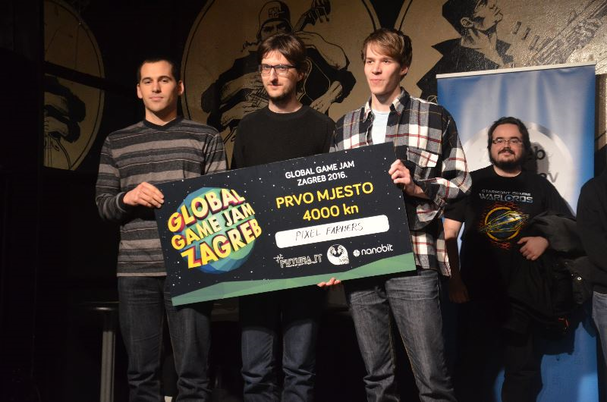
Teams produced 10 games and every team had 10 minutes to present their game. After that, 3 judges from prominent Croatian game companies (Croteam, Little Green Man, Lion Game Lion) played games, talked with teams and at end decided which games are winners. Their criteria was: game completeness, ease to understand game rules and playability. When I heard that, little voice in my head followed with "check, check, check". And really, they liked our game and gave us this fancy piece of cardboard:
Picture from Vidi.hr
This was the first GGJ in Croatia and I hope that it will become tradition. Like I said, we had fun, learned new things and meet interesting people. Organizers did a pretty good job, we had food and drinks. They also provided laptops but majority of people brought their own, so what almost everyone could use was an extra display.

You can check Goat Rescue HERE and all games made for GGJ Zagreb 2016 HERE.

Tuesday, June 30, 2015

Mini quadcopter

Drone mania bite me and now I have a new hobby. After two weeks of research and tons of watched videos, I placed my order, actually dozens of orders. Complete solutions are cool, but I like to build things from pieces. That way I can learn how things work and have unique product at the end. I decided to start with 250 mm FPV category. These kind of quadcopters are very popular, meaning it's easy to find parts and build tutorials.

Main tutorial that I followed was recorded by Bruce Simpson. Here is the first part in series:

In video's description on YT, there is a list of parts but it's incomplete, so here is a full list of parts I used:
FPV system:

I bought as much as I could from local stores. To my surprise, some prices were lower than ones on ebay.

Short build log

After one month majority of parts came:

and fun started:

I didn't documented the whole process, so it might look from pictures above that it can be completed between breakfast and lunch, but just video tutorial series that I linked above lasts few hours.

PS4 or quadcopter?

The price between those two is pretty similar. That is, if a quadcopter survives first fly tests. My first fly attempt ended after just a few seconds. Quad raised a bit but floated backwards and scraped a wall with propellers, resulting with light prop damage and one prop cap falling off. On my second fly attempt I managed to get quad in the air and wrestled with controls on the radio to hold quad steady. My happy grin didn't last long, because suddenly, at maybe 3 meters height, prop cap got loss, and quad hit the grass. I spent half hour searching through grass, but didn't find the cap.


Flying by looking at quadcopter is OK, but the real fun starts with FPV. I'm still waiting for my action camera to come, so I'll share a FPV video from a pro pilot Boris B.:

So all in all, my answer to the question is quadcopter.

UPDATE:

Here are two videos that I took. First one is altitude test, second is distance test.


Monday, February 16, 2015

dotSwift

dotSwift is a Swift conference, held this year on February 6th. With my colleagues from FIVE, I had the honour to attend this event in gorgeous Théâtre des Variétés in Paris. With the promises given on their website and a sound list of lecturers, expectations were high.

Taken at dotSwift in Paris on November 6th, 2015 by Nicolas Ravelli

One of dotSwift's mottos is "Made by developers, for developers". At the very start of the conference, director Sylvain instructed audience to shake hands and introduce with people around. Interaction between developers was additionally encouraged at coffee breaks. The conference consisted of three blocks of lectures with coffee breaks between blocks.
There were 8 lectures capped on 20 minutes and 5 mini lectures caped on 5 minutes. Twenty minutes is short enough for keeping concentration but barely enough for deeper insight into a topic, not to mention five minute ones. Though, it all depends on lecturer and how he's prepared and there were noticeable differences in quality between lecturers.

Main theme of the conference was state and maturity of the language and accompanying tools like XCode and comparison with its ancestor Objective C. Overall conclusion is that language is mature enough for production but XCode is trailing behind and still has some frustrating bugs. All lectures were recorded and are available on dotSwift's website. I advise watching lectures from Ash Furrow on Swift in production, Daniel Steinberg on comparison between Objective C and Swift, Dimitri Dupuis-Latour on Optionals in Swift and Kyle Fuller on Functional programming.
After the conference, main sponsor BlaBlaCar paid a round in nearby French Beer Factory and socializing continued till late hours.
Next day, there was a workshop organized on a subject of building frameworks with Swift. It was available only to first 30 people who registered via external page and a lot of people ended on a waiting list.

This was a first dotSwift conference and there is a space for improvements. Inspiration should be WWDC. Themes should be more distinct. Specific lectures like Core Bluetooth can't be fitted in just five minutes. It would be nice to have more than one workshop. Updates and news should be visible on official website, not just on Twitter. With all that said, it was an interesting conference with several great lecturers that I mentioned above. I recommend it.